Evidence-first compatibility guide
Citron Emulator Compatibility List: Games, Devices, and Build Checks
A Citron emulator compatibility list is useful only when it records the exact build, device, graphics driver, game update, and test result. This guide explains what the official releases prove, what they do not prove, and how to create a compatibility result you can reproduce instead of trusting an unsupported green checkmark.

The short answer: there is no permanent universal compatibility list
Citron is available for Windows, Android, Linux, and macOS, so those platforms are supported at the build-distribution level. That does not mean every Nintendo Switch game is playable on every device. Game compatibility changes with Citron releases, graphics drivers, firmware and keys sourced from your own console, game updates, DLC, mods, rendering backends, and hardware limits.
The most useful compatibility entry therefore reads like a test record: game name and version, Citron build hash, operating system, CPU, GPU, driver, backend, settings changed from default, test duration, and the exact point where the result failed or became playable. A list that says only “works” or “does not work” can be outdated or impossible to reproduce.
Use the status definitions below consistently. Then verify the same game against official release notes, open repository issues, and a clean local test. This approach is slower than copying a community spreadsheet, but it prevents one successful boot screen from being misreported as full compatibility.
For a concrete entry, record the game title and update, then note whether it reaches gameplay, saves, reloads, and repeats the same failure on the exact Citron build. A Fire Emblem: Three Houses or Three Hopes result should name the scene, renderer, driver, and test duration; the title alone is not enough to claim compatibility.
Use consistent labels
Citron emulator compatibility status legend
A useful list separates complete playability from partial progress. Record the lowest status that accurately describes the full test, not the best screenshot you captured.
Completes normal play sessions
The game reaches gameplay, saves and loads, and can be played for a meaningful session without a blocking crash or severe rendering failure.
Include test duration, frame pacing notes, and any settings changed from default.Gameplay works but problems remain
The game reaches gameplay, but graphics, audio, input, performance, cutscenes, save data, or stability problems materially affect the experience.
Name the affected scene or feature instead of writing only “minor bugs.”Starts but does not prove playability
The title reaches a logo, menu, loading screen, or early scene but cannot enter or sustain normal gameplay.
Record the last successful screen and the first repeatable failure.No reproducible current result
No recent test matches the current build and a sufficiently documented device configuration.
Do not convert an old result, a video title, or a forum claim into a current status.Platform and build compatibility verified from official releases
The official release assets confirm which operating-system packages are published. They do not certify individual game performance. The stable and CI rows below were checked from first-party GitHub sources on August 7, 2026.
| Platform | Verified build path | What this proves | What still needs testing |
|---|---|---|---|
| Windows 10/11 x64 | Stable 2026-04-27 MSVC or clangtron ZIP; nightly-windows 22d5038ec from 2026-08-07 | The project publishes native Windows x64 archives. | GPU driver, Visual C++ runtime, controller, game, and settings compatibility remain device-specific. |
| Android | Stable app-mainline-release.apk and Android 8 Elite build; nightly-android 22d5038ec | The project publishes Android APK assets. | Chipset, Android version, GPU driver, thermal limits, and storage permissions can change results. |
| Linux and Steam Deck | Stable x86_64, x86_64_v3, and aarch64 AppImages; nightly-linux 22d5038ec | Linux AppImage packages exist, including an x86_64 path suitable for testing on Steam Deck. | SteamOS version, Mesa driver, desktop/game mode, permissions, and controller mapping still require a local test. |
| macOS | Stable 2026-04-27 DMG and nightly-macos 356b62908 | A macOS disk image is distributed. | Mac model, OS version, graphics support, signing warnings, and each game remain separate compatibility questions. |
Checked August 22, 2026: stable remains 2026-04-27; Windows and Android use 22d5038ec from August 4, Linux uses 22d5038ec from August 6, and macOS uses 356b62908 from August 21.
Repeatable testing
How to check a game for the Citron emulator compatibility list
Start from clean, legal inputs and change one variable at a time. This makes the result useful to you and to anyone comparing a similar device.
Record the exact Citron build
Write down the stable tag or nightly hash before launching the game. Never merge stable and nightly observations into one result.
Capture the device baseline
Record OS, CPU or Android chipset, GPU, driver version, memory, and whether the device is in a power-saving mode.
Use your own legal game and system files
Record the game version, update, DLC, and mod state. Keep firmware and keys consistent during comparison tests.
Test defaults before tweaks
Launch with default settings first. If you change the renderer, resolution, accuracy, shader, or memory option, note each change.
Classify the lowest repeatable result
Test more than the title screen. Save, load, enter gameplay, revisit the failure point, and assign playable, runs with issues, boots only, or untested.
Why two Citron compatibility reports can disagree
Conflicting reports do not always mean one tester is wrong. They often describe different software and hardware combinations.
Stable versus nightly build
A nightly may contain a fix that the stable release lacks, but it can also introduce a regression. Always include the tag or hash.
GPU and graphics driver
Rendering bugs can be specific to NVIDIA, AMD, Intel, Adreno, Mali, Apple silicon, Mesa, or a particular driver release.
Game version and add-ons
Base game, update version, DLC, translation patches, texture packs, and mods can follow different code paths and produce different failures.
Firmware and keys
Incorrect, mismatched, or outdated files from your own console can look like a game-compatibility problem. Diagnose setup before blaming the emulator core.
Renderer and settings
A different backend, accuracy level, resolution multiplier, shader option, or asynchronous setting may fix one title and break another.
Thermals and power limits
Phones and handhelds can throttle after a short test. A menu screenshot does not reveal performance after twenty minutes of gameplay.
Read first-party evidence carefully
What official Citron release notes can tell you
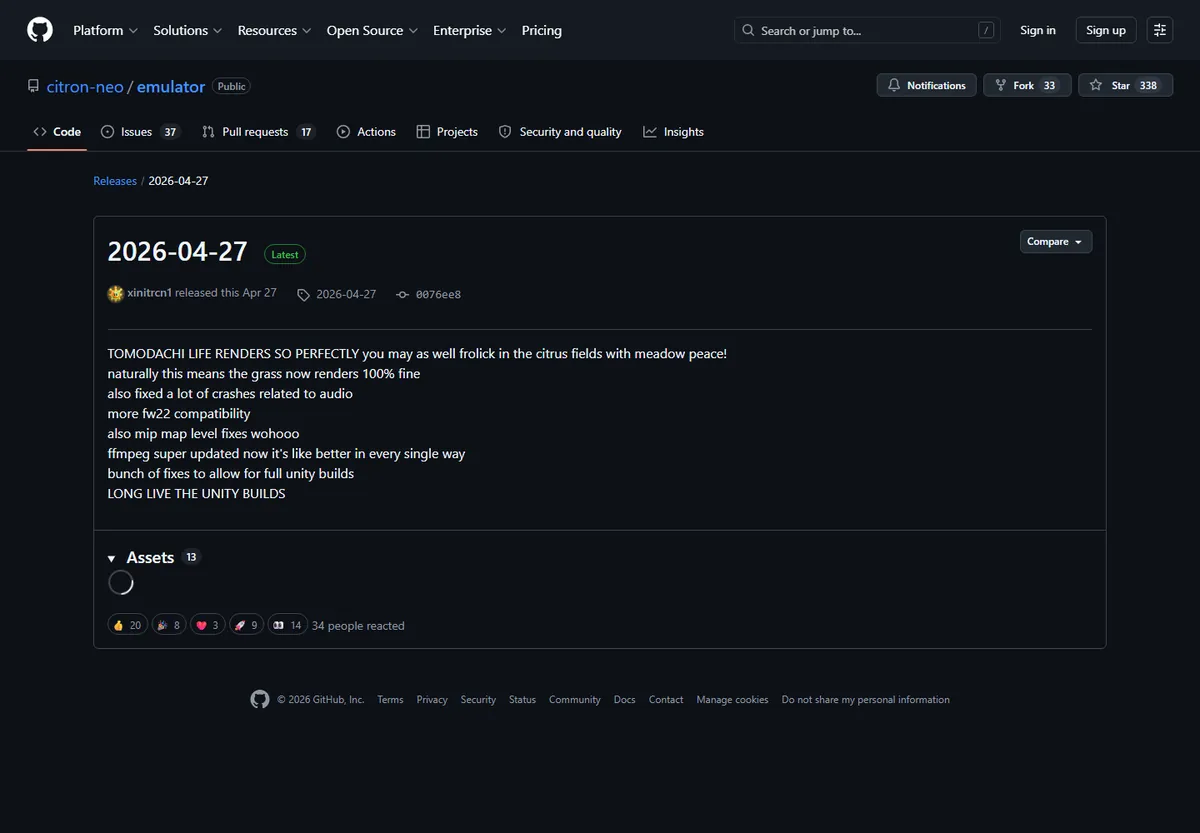
Official release notes are valuable because they connect a change to a specific release. The 2026-04-27 stable page, for example, mentions rendering and crash fixes plus a specific game result. That is evidence for that build and that reported scenario, not proof that every scene, update, device, or later nightly is equally compatible.
Use release notes to decide what to retest. Then open current issues and compare the reporter’s build, hardware, driver, game version, logs, and reproduction steps with your own environment. A closed issue may mean the code changed; it does not automatically mean every hardware combination is fixed.
Avoid lists that copy release-note sentences without dates or build identifiers. Compatibility ages quickly, so the source and test date belong beside every claim.
Compatibility troubleshooting before you mark a game unsupported
Work from setup problems toward emulator regressions. Keep a copy of logs and change one variable per retest.
| Symptom | Check first | Next step |
|---|---|---|
| Game does not appear in the library | Game dump path, supported file access, permissions, and whether the file is a legal dump you can read locally. | Re-add the directory and review the keys/firmware setup guide before assigning a compatibility status. |
| Black screen after launch | Build hash, game update, renderer, GPU driver, logs, and whether audio or input indicates the game is running. | Retest default settings, then compare one alternate backend or a newer verified build. |
| Crashes at the same scene | Save state versus in-game save, update/DLC/mod state, memory pressure, and matching issue reports. | Reproduce twice, preserve the log, and report the exact scene with hardware and build details. |
| Playable at first, then slows down | Temperature, clock speed, power mode, shader compilation, memory use, and test duration. | Repeat a longer run after cooling the device and record average performance, not the opening minute. |
| Controller works in menus but not in game | Controller profile, player assignment, handheld/docked mode, Steam Input, Android mapping, and game-specific input requirements. | Confirm mapping in Citron, disable duplicate input layers, and retest with a clean profile. |
Compatibility questions
Citron emulator compatibility list FAQ
Where is the official Citron emulator compatibility list?
The public project provides releases and an issue tracker, but a permanent official database covering every game, device, driver, and build was not found during the August 7, 2026 check. Treat third-party lists as dated test reports and verify the details yourself.
Does Citron work with every Nintendo Switch game?
No compatibility guide can responsibly promise that. Some games may be playable, some may run with issues, some may only boot, and untested titles should remain untested until a reproducible current result exists.
Is Citron compatible with Steam Deck?
The official project publishes Linux x86_64 AppImages, so Steam Deck has a valid package path for testing. Actual game results still depend on SteamOS, Mesa, permissions, controller mapping, build hash, and each game.
Should I use stable or nightly for compatibility testing?
Start with stable for a predictable baseline. Use a nightly when release notes or an issue indicate a relevant fix, and record the nightly hash because later nightlies can behave differently.
Can firmware or prod.keys fix an incompatible game?
Correct files from your own console can resolve setup errors, but they do not guarantee game compatibility. This site does not distribute firmware, prod.keys, title.keys, games, or bypass tools.
Is Citron emulator safe to test?
Reduce risk by using first-party GitHub release links, scanning downloaded files locally, avoiding repacked mirrors, keeping backups, and never downloading bundled games, firmware, or key packs from compatibility pages.
How should I record a Fire Emblem compatibility result?
Record the game and update, Citron build hash, device and driver, renderer, test duration, and whether the title saves, reloads, and reaches normal gameplay. A Fire Emblem: Three Hopes or Three Houses result is one dated environment report, not a promise for every device.
Primary sources
Sources used for this compatibility guide
These links support build availability, dates, asset names, and current issue research. They do not replace a local test for a specific game.
- Official stable release 2026-04-27Stable assets and release notes checked August 7, 2026.
- Official Citron CI releasesChecked August 22, 2026: stable remains 2026-04-27; Windows and Android use 22d5038ec from August 4, Linux uses 22d5038ec from August 6, and macOS uses 356b62908 from August 21.
- Official emulator issue trackerUse current issues to compare builds, logs, hardware, and reproducible failures.